Workflow
Claude Artifacts
The live preview panel in claude.ai that renders HTML, React, and SVG outputs immediately — prototype in one prompt, iterate in plain language, deploy in minutes.
TL;DRWhen Claude determines that its output is a self-contained, renderable thing — an interactive tool, a component, a diagram, a document — it places the result in a separate panel on the right side of the claude.ai interface rather than streaming it into the conversation. That panel is an artifact. HTML renders live in a sandboxed iframe. React components compile and run immediately. SVGs display as vector images. The conversation continues on the left; the artifact stays visible on the right.
The practical effect is that you can iterate in plain language. "Make the button red." "Add a dark mode toggle." "Use a pie chart instead of a bar chart." Each request updates the artifact in place, with the full context of every prior turn preserved. What would take hours to wire up locally can be prototyped in minutes — and when you're done, you can download the result or share it with a link.
The Four Artifact Types
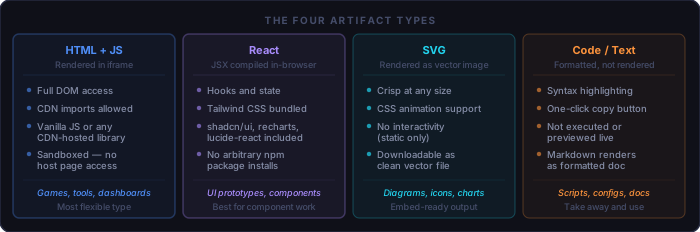
The type determines how the artifact renders and what capabilities are available inside it:
HTML + JavaScript
  # Full browser environment, sandboxed iframe.
  # Import libraries via CDN script tags — no installer needed.
  # Best for: games, data tools, anything with complex DOM manipulation.
  # Caveat: fetch() calls to external APIs blocked by CORS unless the API allows it.

React
  # JSX compiled in-browser; React 18 hooks available.
  # Pre-loaded: Tailwind CSS, shadcn/ui, recharts, lucide-react, date-fns.
  # Best for: UI component prototypes, data visualisation, interactive forms.
  # Caveat: only the preset library list is available; no arbitrary npm installs.

SVG
  # Rendered directly as a vector image; crisp at any zoom level.
  # CSS animation is supported; JavaScript is not.
  # Best for: diagrams, flowcharts, icons, charts you'll embed in a document.
  # Caveat: purely static — no interactivity.

Code / Text / Markdown
  # Syntax-highlighted display with a one-click copy button.
  # Markdown is rendered as formatted text; code is not executed.
  # Best for: scripts, configs, documentation, structured reports to copy away.
When Artifacts Work Well — and When They Don't
Artifacts are prototyping tools. They are not a deployment target. The distinction matters before you invest time iterating on one:
Good fit for an artifact:
  [ ] Interactive tool for personal or one-off use (calculator, formatter, converter)
  [ ] Visual prototype to test a layout or component idea before building for real
  [ ] Data visualisation from a dataset you paste or describe
  [ ] Diagram or SVG to embed in a document or presentation
  [ ] Standalone document (report, spec, README) formatted for easy reading
  [ ] Demo or proof-of-concept to share with a stakeholder

Wrong tool:
  [ ] Needs a real backend or database (artifacts have no persistent server-side state)
  [ ] Will be actively maintained and extended by a team
  [ ] Depends on npm packages not in the React preset list
  [ ] Requires CORS-sensitive API calls to third-party services
  [ ] Has security requirements (authentication, data isolation, audit logging)
  [ ] The resulting code is over ~500 lines (harder to iterate, better in your own editor)
The question to ask before starting is: will I throw this away once I learn from it, or does someone rely on it? If someone relies on it, build it properly. If you're still learning what you need, an artifact is the fastest path to finding out.
The Iteration Loop
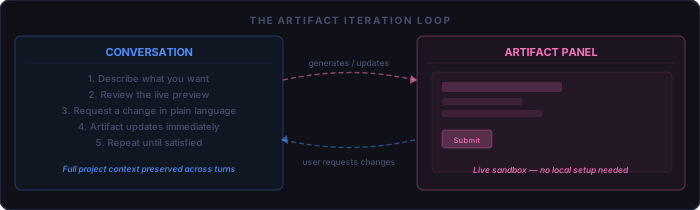
The power of artifacts comes from the loop, not from the first output. Claude's first attempt is rarely production-ready, and it doesn't need to be. You can be vague in the initial prompt and precise in the refinements. The typical path:
# Effective iteration pattern

Turn 1:  broad prompt — gets the structure right, ignore polish
Turn 2:  one visual or UX change — layout, colours, spacing
Turn 3:  one behaviour change — event handling, state, calculation logic
Turn 4:  one finish detail — edge cases, copy, accessibility, mobile layout
Done:   download or share

# What to avoid
# Packing ten changes into one turn — Claude will implement them inconsistently
# Starting over when something is wrong — ask Claude to fix the specific thing
# Iterating indefinitely — set an exit criterion before you start
Prompting for Good Artifacts
Claude will produce an artifact any time the output is clearly self-contained and renderable. To get a useful first draft rather than a generic one, be explicit about four things:
1. Type
   "Create an HTML artifact..."    # explicit type prevents Claude guessing wrong
   "Build a React component..."
   "Generate an SVG diagram..."

2. What it does
   Describe the core behaviour, not the visual appearance.
   "Calculates contrast ratio between two hex colors" beats "looks nice"

3. Interactions
   List the things a user can do, even roughly.
   "User types two hex values. Result updates live as they type."

4. Data
   Paste the actual data, schema, or example content inline.
   Claude generates better code against real data than against a description of data.
You do not need to specify the styling in detail. Claude will apply sensible defaults. Iterate on appearance once the behaviour is correct — it is faster that way.
Step-by-Step: A Color Contrast Checker
This walkthrough builds a useful standalone tool in four turns. The tool calculates the contrast ratio between two hex colours and reports the WCAG accessibility rating. Each step is a single prompt.
Turn 1 — Get the structure working
Create an HTML artifact: a color contrast checker. Two inputs for hex color values
(foreground and background). Calculate the WCAG contrast ratio and display whether
it passes AA and AAA for normal text and large text. Show a sample text preview
using the selected colors.
Claude generates a complete working page. The contrast ratio math is correct out of the box — WCAG contrast is a well-known calculation. The first result is functional but may look plain. That's fine. Behaviour first, appearance second.
Turn 2 — Make it reactive
Update the contrast ratio and preview in real time as the user types, without
requiring a button click.
One sentence, one behaviour change. Claude rewires the event listeners from
onclick to oninput and recalculates on every keystroke.
No need to explain the existing code structure — Claude already has it.
Turn 3 — Polish the output
Add a button to swap the foreground and background colors. Color the pass/fail
badges green for pass and red for fail. Show the exact ratio as a number like 4.5:1.
Three small changes in one turn — they're all cosmetic and unambiguous, so grouping them here is fine. If they conflicted with each other, split them across turns.
Turn 4 — Add a colour picker
Add a color picker input next to each hex field that stays in sync with the
typed value. Clicking the swatch opens the native color picker.
The artifact now has two entry paths — typing a hex code or clicking a swatch — both keeping the other in sync. Four turns, four minutes. The tool is small, self-contained, correct, and ready to share.
Checkpoint: does it need more?
Before downloading, ask: is there anything broken, anything confusing, anything a first-time user would miss? If yes, one more turn. If no, you're done. Artifacts accumulate complexity with each iteration — stop when the tool does what it needs to do.
Available Libraries and Constraints
The library availability depends on which artifact type you're in. For React artifacts, the following are pre-loaded and importable without a CDN URL:
Always available in React artifacts:
  react, react-dom        # React 18 — hooks, context, refs
  tailwindcss             # utility classes — no config needed
  @shadcn/ui              # accessible component library
  recharts                # charts: line, bar, pie, area, scatter
  lucide-react            # icon library (1000+ icons)
  date-fns                # date parsing, formatting, arithmetic

Available in HTML + JS artifacts (via CDN script tags):
  Chart.js, D3.js, Three.js, Leaflet, Plotly, Alpine.js, ...
  # any library with a CDN URL works — Claude will add the script tag

Not available in either type:
  # npm packages outside the preset list (no install mechanism)
  # persistent server-side storage (no backend)
  # WebSockets or SSE to arbitrary servers
  # fetch() to CORS-restricted APIs (unless that API sends open headers)
  # localStorage that persists across separate claude.ai sessions
When you need a library that's not in the list, switch to an HTML artifact and have Claude import it from a CDN. Most JavaScript libraries publish to unpkg.com or cdnjs.com, and Claude knows the correct CDN URLs for common ones.
Deploying Artifacts
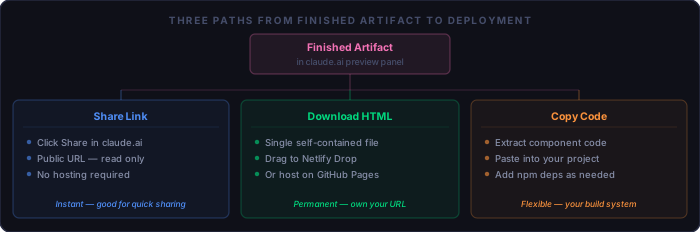
Share Link
Click the Share button in the artifact panel header. Claude generates a
public URL (formatted as claude.ai/artifacts/<id>) that anyone can open
without a Claude account. The recipient sees the live artifact in a read-only viewer.
They cannot edit it, but they can use it interactively. This is the fastest option for
sharing a prototype with a stakeholder.
Download as HTML
Click the download icon in the artifact panel. Claude generates a single self-contained
.html file — all styles, scripts, and markup in one file. Open it locally
in any browser or host it on a static server:
Netlify Drop   # drag the .html file to netlify.com/drop — live in 10 seconds
GitHub Pages   # commit as index.html, enable Pages — free, permanent URL
Any web server # scp the file to /var/www/yoursite/ — no build step
Locally        # open file:// in a browser — works offline for personal tools
The downloaded HTML file is entirely portable. It has no external dependencies that would break if a CDN went down — for React artifacts, Claude inlines the compiled output rather than pointing to external URLs. What you download is what runs.
Copy the Code
If you want to integrate the artifact into an existing project rather than deploy it as a
standalone page, use the copy button to take the component code directly. For a React
artifact, this is JSX you can drop into a .tsx file. Add the npm packages
that were pre-loaded in the artifact (recharts, lucide-react,
etc.) to your package.json and it will run.
# Integrating a copied React artifact component

npm install recharts lucide-react   # add whatever the artifact used

# Paste the component code into src/components/MyTool.tsx
# Import and use it in your page:

import { MyTool } from './components/MyTool'

# The Tailwind classes work if your project already uses Tailwind.
# If not, swap them for your own CSS — the logic is framework-agnostic.
Artifacts Worth Having in Your Back Pocket
Some artifact patterns are immediately useful and fast to get right. These are worth knowing as starting points:
Data visualisation
  "Create a React artifact with a recharts bar chart. Data: [paste JSON here]"
  # Recharts is pre-loaded. Paste the actual data; Claude adapts to the schema.

Regex tester
  "HTML artifact: regex input, test string textarea, highlight matches in real time"
  # One of the most useful personal tools — no library dependencies needed.

JSON formatter and validator
  "HTML artifact: JSON input textarea. Format it, validate syntax, show errors inline."
  # Add a path query (like jq) in a follow-up turn if you need to filter.

Markdown editor
  "HTML artifact: split-pane markdown editor. Left: raw text. Right: rendered preview."
  # Use marked.js from CDN for the rendering.

Unit and currency converter
  "HTML artifact: convert between [unit set]. Dropdowns for from/to unit, input updates live."
  # Specify the unit set (weight, length, temperature, cooking volumes, etc.).

Flowchart or architecture diagram
  "SVG artifact: diagram showing [describe the system]. Dark background, labelled boxes."
  # Good for embedding in a doc. Describe the nodes and relationships explicitly.

Pomodoro timer
  "HTML artifact: Pomodoro timer. 25/5 split. Visual progress ring. Browser notification."
  # Browser Notification API works in artifacts if you accept the permission prompt.

Text transformer
  "HTML artifact: input text area, buttons for: title case, UPPER, lower, slug, word count."
  # Genuinely useful daily tool in under two minutes.

Decision matrix
  "React artifact: weighted decision matrix. Add options and criteria, weight each criterion,
   score each option, show ranked results."
  # Takes a few turns to get right; worth the effort for recurring decisions.

CSV data explorer
  "HTML artifact: paste CSV, display as sortable table, filter by any column."
  # Paste real data in turn 2 and ask Claude to match the column names.
Quick Reference
What artifacts are:
  [ ] Right-panel live preview in claude.ai — not available in Claude Code or the API
  [ ] HTML+JS runs in sandboxed iframe; React compiles in-browser; SVG renders as vector
  [ ] Iteration in the same conversation updates the same artifact in place
  [ ] Context from all prior turns is preserved — no need to re-explain

Prompting:
  [ ] Name the type explicitly (HTML artifact / React artifact / SVG artifact)
  [ ] Describe behaviour, not appearance — iterate appearance after behaviour works
  [ ] Paste real data inline when the output depends on a schema or dataset
  [ ] One clear change per turn for behaviour; group small visual changes

Libraries (React):
  [ ] Pre-loaded: React 18, Tailwind, shadcn/ui, recharts, lucide-react, date-fns
  [ ] HTML artifacts: any library available via CDN (Claude adds the script tag)
  [ ] No arbitrary npm installs; no persistent backend; CORS applies to fetch()

Deploying:
  [ ] Share button → public URL, no hosting needed, read-only for recipients
  [ ] Download → single self-contained .html file, host anywhere static
  [ ] Netlify Drop: drag the .html file to netlify.com/drop — live in 10 seconds
  [ ] Copy code → paste into existing project, add npm packages as needed

When not to use artifacts:
  [ ] Needs a real backend, database, or persistent user accounts
  [ ] Will be maintained long-term by a team — build it properly instead
  [ ] Has security or compliance requirements
  [ ] Output exceeds ~500 lines — better to work in your own editor