Workflow
Claude Projects
Two surfaces, two persistence models, one name. Understanding the difference is the starting point for using either one well.
TL;DR
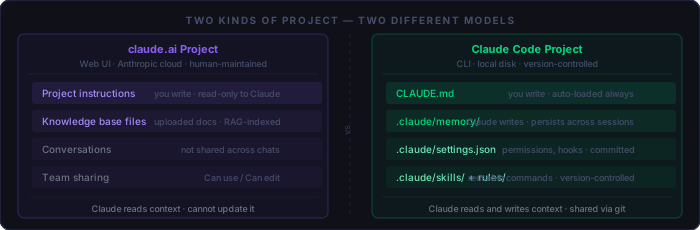
"Project" means two different things in the Claude ecosystem. On
claude.ai, a Project is a web UI feature: a named container where
you store persistent instructions and reference documents, shared across
all conversations in that project. In Claude Code, a project is your
working directory — the .claude/ folder, CLAUDE.md,
memory files, settings, and skills that together define how Claude behaves in
that codebase.
The two are complementary, not competing. Understanding what each one does — and what it cannot do — determines how much friction you carry in your daily workflow. Developers who conflate them end up duplicating context in both places, or wondering why changes they made in one aren't reflected in the other.
claude.ai Projects
claude.ai Projects are available on Pro and higher plans. They give you a persistent workspace that survives across individual conversations: fixed instructions that load for every chat in the project, and a file-based knowledge base Claude can reference via RAG (Retrieval Augmented Generation).
Creating a Project
From claude.ai, click Projects in the left sidebar, then + New Project. Give it a name and description. The name and description are for your organisation — Claude does not see them.
Project Instructions
Instructions are the persistent context that shapes every conversation in the project. Think of them as a standing brief: the role Claude should take, the format you expect responses in, constraints that always apply. They are prepended to every conversation in the project without you having to paste them.
# Example project instructions for a development consultancy

You are a senior code reviewer working on a PHP 8.3 web application.
Always respond with specific file and line references.
Assume the reader is a professional developer — skip beginner context.
Flag security issues before functional issues.
When suggesting changes, show the minimal diff, not the whole file.
Keep instructions focused. Instructions that try to cover every possible case end up being ignored because the relevant part is buried. A 100-word instruction that Claude actually applies is more valuable than a 1,000-word one it partially skips.
The Knowledge Base
The knowledge base holds reference documents: architecture decision records, API specifications, style guides, onboarding docs. Uploaded files are indexed and retrieved via RAG — Claude pulls relevant passages rather than reading every document in full. When your project knowledge approaches the context limit, RAG mode expands capacity automatically on paid plans.
The knowledge base is intentionally static. Claude cannot update or append to it during a conversation. If a document changes, you upload a new version manually. This is the key limitation of claude.ai Projects for active development work: the human is always the integration layer between what Claude learns and what the project knows.
Conversation history is not shared across chats within a project. If you establish context in Monday's conversation, Tuesday's conversation starts fresh. The only persistence is what you put in project instructions and the knowledge base.
Team Sharing
On Claude for Work (Teams/Enterprise) plans, projects can be shared with colleagues at two permission levels:
Can use   — view instructions, start conversations, read knowledge base
             cannot modify instructions, files, or member settings

Can edit  — full access: modify instructions, upload files, manage members
Sharing is done by email or by setting organisation-wide visibility. Shared projects are useful for team-wide reference bases — a shared API specification, a common coding style guide, or a product brief that everyone working on a feature should have in context.
Claude Code Projects
In Claude Code, "project" refers to everything inside the .claude/
directory at your project root, plus CLAUDE.md. These files define
how Claude behaves in that specific codebase. They are plain files on disk,
committed to version control, and loaded automatically at the start of every
Claude Code session in that directory.
The Full Directory Structure
project-root/
├── CLAUDE.md                    # always loaded — project instructions
├── CLAUDE.local.md              # personal additions — gitignored
└── .claude/
    ├── settings.json            # team config — committed
    ├── settings.local.json      # personal overrides — auto-gitignored
    ├── memory/                  # Claude's own notes — see below
    │   ├── MEMORY.md            # index of all memory entries
    │   ├── user_prefs.md        # how you like to work
    │   ├── feedback.md          # corrections Claude remembers
    │   └── project.md           # current goals, decisions, state
    ├── skills/                  # reusable slash commands
    │   └── security-check/
    │       └── SKILL.md
    └── rules/                   # conditional instructions by file path
        └── db-layer.md          # loaded only when touching DB files
CLAUDE.md vs. Memory vs. Skills
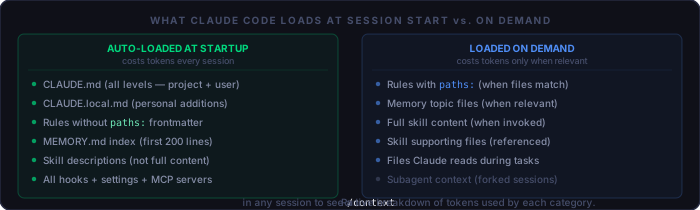
Each component serves a distinct purpose. Mixing them produces context that is harder to maintain and costs more tokens than necessary.
CLAUDE.md        You write this. Static facts about the project:
                 how to run it, architecture, conventions, what to avoid.
                 Loaded every session. Keep it under 300 tokens.

.claude/memory/  Claude writes this. Learned context across sessions:
                 your preferences, past decisions, corrections, current goals.
                 MEMORY.md index loaded at startup; topic files on demand.

.claude/skills/  You write this (Claude can invoke). Reusable workflows:
                 security audits, PR summaries, deploy checklists.
                 Descriptions loaded at startup; full content on invocation.

.claude/rules/   You write this. Conditional instructions by file path:
                 DB layer rules load only when touching DB files.
                 Rules without paths load at startup (treat like CLAUDE.md).
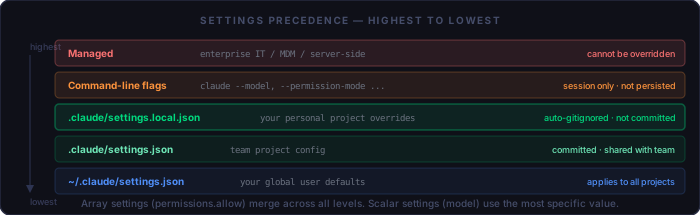
settings.json vs. settings.local.json
settings.json is the team configuration — committed to git and shared
with every developer who clones the repository. It holds the permissions your
team has agreed Claude should have in this codebase, the hooks that run
automatically, and any shared model preferences.
settings.local.json is automatically added to .gitignore
by Claude Code. It holds your personal overrides: tools you have pre-approved
for your own machine, personal model preferences, or local paths that don't
exist on other developers' machines. It takes precedence over settings.json.
What Loads at Startup
Step-by-Step: Setting Up a Claude Code Project
Step 1 — Write CLAUDE.md
Start with the minimum that reliably orients Claude in a fresh session. Answer three questions: how do I run this project, what should I know about its structure, and what must I never do here.
# CLAUDE.md skeleton

## Run
docker compose up          # serves at http://localhost:8080
docker compose up --build  # after Dockerfile changes

## Architecture
No framework. Apache → .htaccess rewrites → PHP files.
Topics registered in includes/topics.php.
Colors exclusively in css/tokens.css — never inline.

## Do not
- Add npm, composer, or any build step
- Store credentials in source files — use includes/auth.php (web-blocked)
Keep it under 300 tokens. Everything else belongs in a task-specific file or in memory, loaded when it is actually needed.
Step 2 — Configure settings.json
Set the permissions your team agrees Claude should have, and wire any hooks that should fire automatically. This file is committed — agree on it with collaborators before relying on it.
{
  "permissions": {
    "allow": [
      "Bash(docker compose *)",
      "Bash(git diff*)",
      "Bash(git log*)",
      "Bash(git status)"
    ],
    "deny": [
      "Read(includes/auth.php)",   // credential file
      "Read(.env*)",               // environment secrets
      "Bash(git push*)"            // require human confirmation
    ]
  },
  "hooks": {
    "PostToolUse": [{
      "matcher": "Write|Edit",
      "hooks": [{ "type": "command", "command": "python .claude/update_timestamp.py" }]
    }]
  }
}
Step 3 — Add settings.local.json for personal overrides
This file never gets committed. Use it for tools you want pre-approved on your own machine without requiring team agreement.
{
  "permissions": {
    "allow": [
      "Bash(php -r *)",    // PHP available on this machine
      "Bash(open *)"       // macOS — open files in browser
    ]
  }
}
Step 4 — Initialise memory
Create the memory directory and an empty index. Claude will populate entries over time, but starting with a clear index prevents it from writing to an unexpected location.
mkdir -p .claude/memory
# Create an empty index
echo "# Memory Index\n" > .claude/memory/MEMORY.md
Step 5 — Set up a .gitignore entry
Claude Code auto-ignores settings.local.json, but you should
also protect CLAUDE.local.md and any machine-specific files
you add to .claude/.
# .gitignore additions
CLAUDE.local.md
.claude/settings.local.json   # auto-ignored, but explicit is clear
Step 6 — Verify with /context
Start a Claude Code session and run /context. It shows a live
breakdown of token usage per category. If CLAUDE.md is consuming more than
300–400 tokens, trim it. If rules are loading unexpectedly, check their
paths: frontmatter.
Tips and Good Practices
Keep CLAUDE.md surgical
Every line in CLAUDE.md costs tokens on every session, forever. The right test: if you removed a line, would Claude's output degrade within a single session? If not, the line belongs somewhere else — a rule file, the knowledge base, or not at all. Three accurate sentences outperform ten vague ones.
Use rules/ for context that only matters sometimes
If you have instructions that only apply when Claude is touching a specific
layer of the code — database migrations, authentication, payment processing —
put them in a rules file with a paths: constraint. They load when
relevant and cost nothing when they are not.
---
# .claude/rules/auth-layer.md
paths: "includes/auth.php,sign-in*.php"
---

Auth files are security-critical. Before any edit:
1. Confirm the change does not weaken session handling
2. Verify credentials are not hardcoded — read from includes/auth.php
3. Confirm session_regenerate_id(true) follows any successful login
Deny credential files explicitly
Even if credentials are in a correctly web-blocked file, you can add a
deny rule in settings.json so Claude never reads them into its
context — and therefore never risks including them in generated output or
tool calls:
"deny": [
  "Read(includes/auth.php)",
  "Read(.env)",
  "Read(.env.*)",
  "Read(**/secrets/**)"
]
Periodic memory cleanup
Memory files accumulate entries that were true last month but are not true now. A project-state memory written during a sprint that finished three weeks ago does not help Claude — it actively misleads it. Schedule a brief review every time you start a new major piece of work:
Memory audit — run at the start of each new sprint or feature:
  [ ] Open .claude/memory/MEMORY.md and read the index
  [ ] Delete any project_*.md entries that describe completed or abandoned work
  [ ] Update project_*.md entries that describe the current sprint goals
  [ ] Verify user_*.md and feedback_*.md entries still reflect how you work
  [ ] Run /context to confirm startup token cost is reasonable
Periodic security evaluation
Project configuration files accumulate permissions over time. A permission that was temporarily added for a migration task may still be there six months later. Review regularly:
Security audit — run when the project has been active for 30+ days:
  [ ] Review settings.json allow list — remove permissions no longer needed
  [ ] Review settings.local.json — same
  [ ] Verify deny list covers all credential and secret files
  [ ] Check CLAUDE.md for any hardcoded values that should be references
  [ ] Check memory files for any stored values that look like secrets
  [ ] Review hooks — confirm they only run intended commands
  [ ] Run /security-check (if you have the skill installed) on .claude/ itself
What to commit vs. what to keep local
Commit (shared with team):
  CLAUDE.md                    ✓ project instructions
  .claude/settings.json        ✓ team permissions + hooks
  .claude/skills/              ✓ team workflows
  .claude/rules/               ✓ conditional instructions
  .mcp.json                    ✓ shared MCP servers

Keep local (never commit):
  CLAUDE.local.md              ✕ personal preferences
  .claude/settings.local.json  ✕ auto-gitignored by Claude Code
  .claude/memory/              ✕ Claude's personal notes about your session
claude.ai Projects vs. Claude Code — Choosing
The two are not alternatives — they are tools for different stages of work. The question is not which one to use but what belongs in each.
Use claude.ai Projects for:
  Shared reference material — API specs, design docs, onboarding guides
  Non-technical team members who need consistent AI behaviour
  Conversations about documents rather than code
  Sharing context with stakeholders who don't use Claude Code

Use Claude Code Projects for:
  All active development work — editing, testing, refactoring
  Anything that needs to run the project (builds, tests, migrations)
  Workflows that span multiple sessions (multi-day features)
  Teams that want project config version-controlled alongside code

Use both when:
  Your team uses claude.ai for design review and Claude Code for implementation
  You want a shared knowledge base (claude.ai) + per-developer workflow (Claude Code)
  The project has non-developer stakeholders plus a development team
The most durable setup: a tight CLAUDE.md that describes the codebase for developers, a claude.ai Project that holds the design brief and product spec for the broader team, and a memory directory that grows incrementally as Claude learns how you specifically like to work. Each layer holds exactly what it is best suited to hold — and nothing else.
Quick Reference
claude.ai Project setup:
  [ ] claude.ai → Projects → New Project
  [ ] Write focused instructions (<500 words) — role, format, constraints
  [ ] Upload reference documents to knowledge base
  [ ] Share with team at appropriate permission level
  [ ] Review and update instructions when project direction changes

Claude Code Project setup:
  [ ] Write CLAUDE.md — run commands, architecture, do-not list
  [ ] Create .claude/settings.json — allow + deny lists, hooks
  [ ] Create .claude/settings.local.json — personal overrides only
  [ ] mkdir .claude/memory + empty MEMORY.md index
  [ ] Add CLAUDE.local.md to .gitignore
  [ ] Run /context to verify startup token cost

Ongoing maintenance:
  [ ] Memory audit at start of each sprint — delete stale project_*.md
  [ ] Security audit every 30 days — review allow/deny lists
  [ ] CLAUDE.md review after major architectural changes
  [ ] Trim knowledge base when documents become outdated