Workflow
The Clone Iteration Workflow
Stepwise design iteration where every stage is a clean, self-contained project — and nothing is ever thrown away.
TL;DRMost development workflows treat iteration as mutation: you open the project, make changes, commit, and the previous state survives only in git history. That works well for shipping software. It works less well for design exploration — where you want to be able to return to any prior state, run it live, compare it against a later version, and hand it to someone else as a complete, working artifact without explaining what branch to check out or what environment to configure.
The clone iteration workflow treats each significant stage as its own self-contained project. Every iteration is a full copy of the previous one — source, configuration, and Docker setup included. You move forward by cloning, cleaning, and building on top. Nothing is destroyed. Any stage can be stood up independently with one command.
For AI-assisted development with Claude Code, this workflow has a second advantage: it gives Claude a clean context at each stage. Stale memories, resolved decisions, and previous-iteration cruft don't accumulate into a context that grows noisier over time. Each clone starts lean. The signal-to-noise ratio stays high.
The Structure
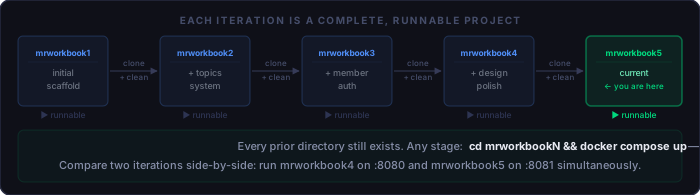
Each project lives in its own directory with a sequential suffix:
C:\aiwork\
├── mrworkbook1\   # initial scaffold — typography, tokens, layout
├── mrworkbook2\   # first topic pages added
├── mrworkbook3\   # member auth, sign-in flow
├── mrworkbook4\   # design refinement, additional topics
└── mrworkbook5\   # current iteration — this project
Each directory is a complete, runnable copy of everything that existed at the end of the
previous stage. No shared state. No symlinks. No "run this migration first." Clone it,
run docker compose up, and it works.
Why Not Use Git Branches?
Git branches are the right tool for feature work and collaborative development. They are less suited to design iteration for a few reasons:
- Standing up a prior state requires switching context. With clones, comparing two iterations means opening two terminal tabs. With branches, it means stashing work, checking out, waiting for a rebuild, checking back out, unstashing.
-
Claude Code's memory is project-scoped, not branch-scoped. Memory
files,
CLAUDE.md, and hook configurations are in the working directory. A new clone gets a deliberate, curated starting context. A new branch inherits everything from the current branch including anything you haven't cleaned up yet. - Docker container names are directory-derived. Two clones can run simultaneously (on different ports) without configuration. Two branches of the same repo share the same compose project name and will conflict.
Branches are for collaboration and history. Clones are for stages you want to be able to stand up, demo, and hand off independently.
Have it Both Ways
Each iteration clone is its own directory — mrworkbook1,
mrworkbook2, and so on — all sitting inside a shared parent directory.
That parent can be a git repository.
Commit the parent after each clone, with a message that captures what changed and
why. The clone directories become snapshots in git history: you can see the exact
state of every iteration, compare any two stages with git diff, and
restore a previous one without having to remember which port it was on or what
container name it used.
# Parent directory layout
aiwork/
├── mrworkbook1/    # iteration 1 — initial layout experiment
├── mrworkbook2/    # iteration 2 — added auth
├── mrworkbook3/    # iteration 3 — current
└── .git/           # parent repo — tracks all iterations as commits
This gives you the best of both approaches. The clones remain fully isolated — independent containers, independent Claude contexts, no cross-contamination between stages. But the parent repo gives you the history and recoverability of git without the branch-per-iteration constraints that break Docker naming and force you to carry forward everything you were trying to leave behind.
Step-by-Step: Starting a New Iteration
Step 1 — Stop the current project's container
Port 8080 is shared across all iterations. The previous container must be stopped before the new one can bind to it.
# In the current project directory
docker compose down
Step 2 — Clone the directory
Copy the entire project directory to the next iteration name. Use robocopy
on Windows or cp -r on Unix. Do not use git clone — this is a filesystem
copy, not a repository operation.
# Windows
robocopy C:\aiwork\mrworkbook5 C:\aiwork\mrworkbook6 /E /XD .git

# Unix / WSL
cp -r /aiwork/mrworkbook5 /aiwork/mrworkbook6
The /XD .git flag excludes the git directory. The new project starts with
no git history — it is a clean working directory, not a fork. If you want version
control inside the new iteration, initialise a fresh repository after copying.
Step 3 — Open the new project in Claude Code
# Navigate to the new directory and open Claude Code
cd C:\aiwork\mrworkbook6
claude
Claude Code scopes its memory and settings to the working directory. Opening the new project directory gives Claude a clean session context tied to the new iteration, separate from the previous one.
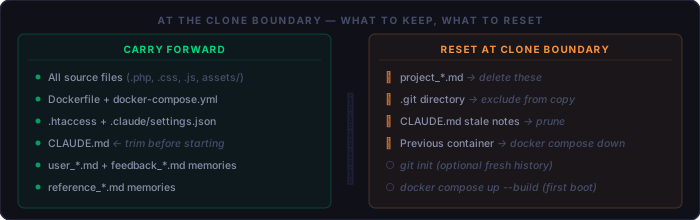
Step 4 — Clean up carried-over memory files
If the previous project accumulated Claude Code memory files, they copied across. Some of that memory is worth keeping. Some is now stale. The rule:
.claude/memory/
├── user_*.md      → KEEP — describes you, valid across all projects
├── feedback_*.md  → KEEP — how Claude should work with you
├── reference_*.md → KEEP — pointers to external systems
└── project_*.md   → DELETE — describes the previous iteration's state
# Delete stale project memories
del .claude\memory\project_*.md # Windows
rm .claude/memory/project_*.md # Unix
# Then update MEMORY.md to remove the deleted entriesStep 5 — Update CLAUDE.md
CLAUDE.md is loaded at the start of every Claude Code session. After a
clone, it reflects the previous iteration. Do one pass before starting any work:
- Remove any notes specific to problems that were resolved in the last iteration
- Update anything that describes current project state (sprint goals, known issues)
- Add the new iteration number or stage name if you use one
- Verify that the "how to run" section still matches the project
Keep it under 300 tokens. Anything longer is carrying context that should be in a task-specific file loaded on demand, not in the always-on project context.
Step 6 — First boot with rebuild
The first start in a new clone should always use --build to ensure the
Docker image is fresh. Subsequent starts in the same iteration can use
docker compose up alone.
docker compose up --build
Verify the site loads at http://localhost:8080 before starting work.
A broken first boot is easier to diagnose on a clean clone than after several hours
of edits.
Step 7 — Commit a baseline
If you initialised git in step 2, make a baseline commit immediately after the first successful boot. This gives you a clean rollback point before any changes in the new iteration, and a clear marker of where the stage started.
git init
git add .
git commit -m "baseline: clone from mrworkbook5"
Adding a New Topic in This Workflow
Adding topics follows the same four-file pattern regardless of which iteration you are in. The clone workflow does not change the process — it just ensures you are starting from a known-good state.
# 1. Create the topic page
cp topics/_template.php topics/<slug>.php
# Edit: $page_title, $page_subtitle, $topic_tag, $topic_accent, body content

# 2. Create the icon
# Add topics/assets/icons/<slug>.svg — 22×22 viewBox, single accent color

# 3. Register the topic
# Add entry to $topics array in includes/topics.php
# Fields: slug, name, tag, desc, glow, color, icon, new, member

# 4. Verify
# Visit http://localhost:8080 — card should appear in the grid
# Click through to the topic page — confirm it loads without error
For member-only topics, set 'member' => true in the topics array and add
the session check at the top of the topic file:
// top of topics/<slug>.php for a member-only page
<?php
session_start();
if (empty($_SESSION['signed_in'])) { header('Location: /sign-in.php'); exit; }
$page_title    = '...';
// rest of page setup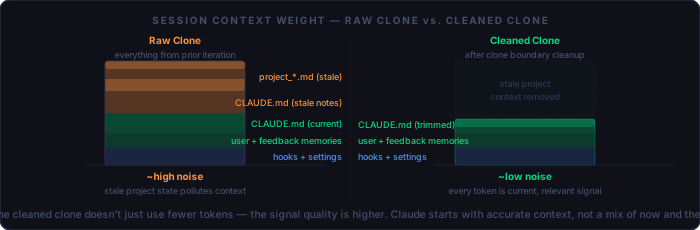
What Stays, What Goes
The decision of what to carry forward and what to leave behind at each clone is the core discipline of this workflow. The wrong call in either direction has a cost: carry too much and the new iteration is burdened by the last one; carry too little and you rebuild things that were already working.
Always carry forward:
  [ ] All source files (PHP, CSS, JS, assets)
  [ ] Docker and Apache configuration
  [ ] CLAUDE.md (trimmed)
  [ ] user_*.md and feedback_*.md memory files
  [ ] .htaccess, settings.json, hooks

Evaluate and trim:
  [ ] CLAUDE.md — remove resolved issues, update current state
  [ ] project_*.md memory files — delete if stale, update if still live

Leave behind (do not copy):
  [ ] .git directory — start history fresh or don't use git
  [ ] Any temp files, logs, or local-only overrides
The Token Efficiency Argument
Every Claude Code session starts by loading CLAUDE.md and any relevant
memory files. In a long-running project without iteration boundaries, these files
accumulate: decisions that were made and then superseded, notes about bugs that were
fixed, context that was true six weeks ago and is misleading now. Claude reads all of it.
The clone workflow enforces a periodic cleanup. At each iteration boundary, you make a
deliberate decision about what context is worth carrying forward. The result is a
CLAUDE.md that describes the project as it is right now, not as it has
been through every stage of its development. Sessions start faster, stay on topic,
and produce fewer responses that are confidently wrong about the current state of
the codebase.
A clean CLAUDE.md at the start of a new iteration is worth more than any prompt engineering you do mid-session. It is the context that shapes every answer.
Quick Reference
New iteration checklist:
  [ ] docker compose down in the previous project
  [ ] robocopy / cp -r to new directory (exclude .git)
  [ ] Delete project_*.md from .claude/memory/
  [ ] Update MEMORY.md index to remove deleted entries
  [ ] Trim CLAUDE.md — remove stale, update current state
  [ ] docker compose up --build in new directory
  [ ] Verify site loads at localhost:8080
  [ ] git init + baseline commit (if using git)

Adding a topic checklist:
  [ ] cp topics/_template.php topics/<slug>.php
  [ ] Write content — $page_title, $page_subtitle, $topic_tag, $topic_accent, body
  [ ] Add assets/icons/<slug>.svg (22×22 viewBox)
  [ ] Add entry to $topics in includes/topics.php
  [ ] Set member => true and add session guard for private topics
  [ ] Confirm card appears on index / topics-member page
  [ ] Confirm topic page loads and reads correctly