Cost / Efficiency
Tokens, Usage & Limits
Understanding the unit of AI work — and how to stop burning through it.
TL;DREvery interaction with an AI model has a cost measured in tokens. Tokens are not a billing abstraction — they are the fundamental unit of what the model reads and writes. Understanding how tokens work, where they accumulate silently, and how usage limits impose real constraints on your workflows is the difference between an AI integration that scales and one that surprises you with a rate-limit wall at the worst possible moment.
What Tokens Actually Are
A token is a chunk of text — not a character and not a word, but something in between.
Models process language by first converting raw text into a sequence of token IDs using a
tokenizer trained alongside the model. The tokenizer groups common character
sequences into single tokens, so frequently occurring words like the or
function often map to a single token, while rare or constructed words get split.
As a practical rule of thumb for English prose: roughly 1 token per 4 characters, or about 750 words per 1,000 tokens. But this varies significantly:
# English prose — typical density
"The quick brown fox" = 5 tokens

# Code — often denser, more tokens per "word"
"getUserPreferences(userId)" = 7 tokens

# Whitespace and indentation count
"    return {" = 4 tokens  # 4 spaces + return + { = 4

# Repeated boilerplate multiplies fast
A 200-line config file ≈ 800–1,200 tokens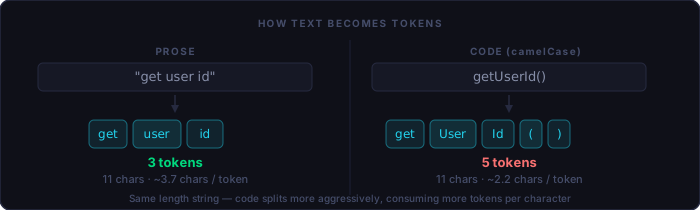
The practical implication: code, JSON, and structured data almost always consume more tokens per meaningful unit than natural language does. Attaching a 500-line file is not a neutral act.
Input vs. Output Tokens
Every API call involves two distinct token pools. Input tokens are everything you send: the system prompt, any conversation history, documents, code snippets, and your current message. Output tokens are what the model generates in response.
Both count toward rate limits and, on paid APIs, both appear in your billing. Output tokens are typically priced at a multiple of input tokens — often 3–5× — because generation is computationally heavier than encoding. A model asked to write a 500-line module is doing something far more expensive than a model asked to review one.
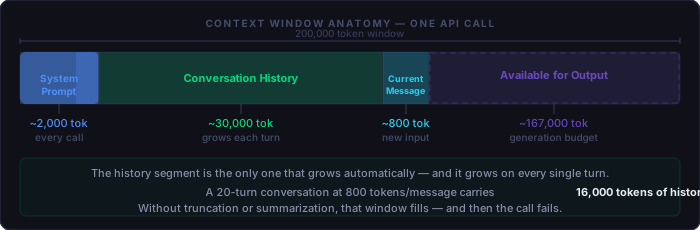
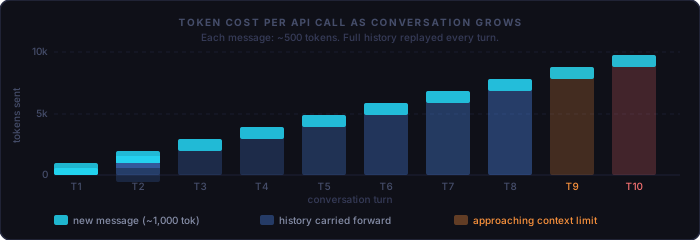
The conversation window is cumulative. Every message you send also carries every prior message. A 30-turn conversation is not 30 requests of equal size — it is 30 requests of rapidly growing size.
The Context Window
The context window is the total number of tokens the model can process in a single call — input and output combined. Modern models offer large windows (100k–200k tokens), and this can create a false sense of abundance. The limit is real: exceed it and the call fails. Approach it carelessly and you will pay for tokens that do not meaningfully improve the result.
Where Tokens Accumulate Without You Noticing
Wasteful token consumption rarely comes from any single obvious source. It accumulates in patterns that feel harmless in isolation:
System Prompt Repetition
Your system prompt is sent with every single API call. A 2,000-token system prompt across 1,000 daily calls is 2 million tokens before a user types a word. If that prompt contains a 400-line style guide, a lengthy disclaimer, and three examples that only apply to one edge case — every call pays for all of it.
Unbounded Conversation History
Chat interfaces that replay the entire conversation thread on each turn are the most common source of runaway token usage. Turn 1 sends 500 tokens. Turn 20 sends 12,000 tokens — mostly history the model has already "seen." Without truncation or summarization, growth is linear but the cost function feels exponential in practice.
Whole-File Attachments
Attaching a complete file when only a function signature or a specific section is relevant is one of the highest-leverage waste vectors. A 600-line service file attached because the user wants to modify one method contributes 500+ tokens of context the model will largely not use.
Redundant Examples
Three worked examples in a prompt may be necessary for the first call. They are rarely necessary for call 47. Prompts that were written for calibration but never trimmed for production continue paying their original cost indefinitely.
Techniques for Reducing Token Waste
Write Tight System Prompts
A system prompt should contain the minimum needed to reliably constrain the model's behavior. Audit it ruthlessly: if a line has not changed the output in any recent test, remove it. Instructions are not free insurance — they cost tokens on every call. Treat the system prompt as production code, not a scratchpad.
# Bloated — 180 tokens
You are an expert senior software engineer with 15 years of experience.
You write clean, well-documented, maintainable code. Always add JSDoc
comments. Always explain your reasoning. Be concise. Be thorough.
Never write incomplete implementations. Prefer readability over
cleverness. Do not use deprecated APIs...

# Tight — 40 tokens
Senior engineer. Return only the changed function. JSDoc on public
methods. No explanations unless asked.
Summarize or Truncate History
For long-running sessions, maintain a rolling summary rather than a full transcript. After every N turns, ask the model to compress the conversation into a paragraph of key decisions and context. Replace the raw history with that summary. You lose verbatim recall but preserve the signal — which is usually all that matters.
Send Only Relevant File Sections
Instead of attaching whole files, extract and send only the relevant function, class, or block. A file read operation that grabs lines 120–165 instead of lines 1–600 is not just cheaper — it focuses the model's attention and often produces better results because the irrelevant context cannot interfere.
Use Prompt Caching
Anthropic's API and some other providers support prompt caching: marking a stable prefix of the input (typically the system prompt plus any large reference documents) for server-side caching. Cached tokens are billed at a significant discount — around 10% of the normal input rate — on subsequent calls. If your system prompt and reference documents don't change between calls, caching makes them nearly free after the first one.
// Anthropic SDK — cache the stable prefix
{
  "system": [
    {
      "type": "text",
      "text": "You are a code reviewer...\n\n[600-line style guide]",
      "cache_control": { "type": "ephemeral" }
    }
  ],
  "messages": [{ "role": "user", "content": "Review this PR..." }]
}
// Cache TTL: 5 minutes. Refresh it before it expires for long sessions.
Prefer Structured Output Over Explanation
Asking the model to return structured JSON or a minimal diff instead of a prose explanation followed by a code block dramatically reduces output tokens. "Return only the modified function" produces fewer tokens than "Explain your changes and then show the updated code." Output tokens are your most expensive category — minimize unnecessary verbosity in responses.
Organizing Projects for Token Efficiency
Token efficiency is not just a prompt-writing skill — it is a project organization decision. How you structure your codebase, your context files, and your AI workflows determines your baseline token cost before you write a single prompt.
Tiered Context Files
Not all context is equally relevant to every task. A CLAUDE.md or equivalent
project context file works best when it is kept minimal and always-relevant. Information
that is only needed for specific tasks — database schema details, API endpoint references,
architecture decision records — belongs in separate files loaded on demand, not in the
global context that every call imports.
project/
├── CLAUDE.md          # ≤300 tokens: always-on essentials
├── .context/
│   ├── schema.md      # loaded only when touching the DB layer
│   ├── api-ref.md     # loaded only when building integrations
│   └── style-guide.md # loaded only for prose/UI tasks
Prefer Narrow Task Scoping
A session that tries to accomplish ten things accumulates history across all of them. A session scoped to one well-defined task runs shorter, uses less context, and produces more coherent output. Start fresh sessions for distinct tasks rather than carrying everything in one growing thread. This is especially important in agentic workflows where the model reads files and executes tools — each operation compounds the running total.
Keep Reference Documents Stable and Cacheable
If your workflow consistently includes a large reference document — an API spec, a design system, a data dictionary — keep it in a stable, unchanging form. Frequent edits to cached documents invalidate the cache and reset the billing discount. Treat cacheable context the way you treat a CDN asset: stable content, versioned changes.
Use Model Selection Intentionally
Flagship models (Opus, GPT-4) cost 5–15× more per token than mid-tier models (Sonnet, GPT-4o-mini). Routing simple, well-defined tasks — classification, extraction, template filling — to a smaller model eliminates a large fraction of cost with no meaningful quality loss. Reserve expensive models for tasks that genuinely require deep reasoning or large context synthesis.
Usage Limits: What They Are and How They Work
API providers enforce usage limits to protect infrastructure stability. Hitting these limits in production is a reliability issue, not just an inconvenience. Understanding their mechanics is the first step to designing around them.
The Two Axes: TPM and RPM
Limits operate primarily on two dimensions:
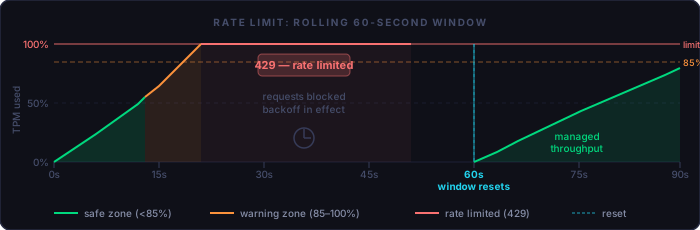
Tokens per minute (TPM) — the total volume of input plus output tokens that can flow through the API in any 60-second window. This is the limit most teams hit first when working with large contexts or high request volumes.
Requests per minute (RPM) — the number of distinct API calls allowed in a 60-second window, regardless of token volume. Heavy use of lightweight prompts can hit RPM before TPM.
Both limits reset on a rolling window. A 429 response means the current window is exhausted — not that you are banned or that today's quota is gone. The practical implication: a brief wait (often 10–60 seconds) is usually sufficient.
Daily and Monthly Limits
Higher-tier usage plans include daily or monthly token ceilings in addition to per-minute limits. These accumulate across all calls in the billing period. A runaway script or an accidentally unbounded loop can consume a significant portion of a daily limit in minutes. Monitoring daily consumption alongside per-minute rate is essential for production deployments.
Tier Progression
Most providers structure limits in tiers tied to account spending history or manual review. New accounts start at conservative limits. As spend accumulates — or after a limit-increase request is approved — the ceiling rises. This means that projects designed for scale should be planned for their target tier, not their starting tier. Validate production-scale throughput in staging before cutover.
Avoiding Timeouts and Rate-Limit Waits
The goal is not to avoid hitting limits at the exact boundary — it is to design systems that degrade gracefully and never stall user-facing work when a limit is reached.
Implement Exponential Backoff with Jitter
The standard approach: on receiving a 429, wait before retrying. The wait duration should double on each consecutive failure (exponential) with a randomized offset (jitter) to prevent thundering-herd behavior when multiple clients retry simultaneously.
async function callWithBackoff(fn, maxAttempts = 5) {
  for (let attempt = 0; attempt < maxAttempts; attempt++) {
    try {
      return await fn();
    } catch (err) {
      if (err.status !== 429 || attempt === maxAttempts - 1) throw err;
      const base = Math.min(1000 * 2 ** attempt, 30000);
      const jitter = Math.random() * 1000;
      await sleep(base + jitter);
    }
  }
}
→ Step-by-step: using this with the Claude API
Self-Throttle Before Hitting the Limit
The most reliable way to avoid 429 errors is to never reach the limit in the first place. Track your own token consumption in a sliding window and add artificial delay when approaching the threshold — for example, when you've consumed 85% of your per-minute allowance. This is more predictable than reactive backoff and eliminates the user-visible pause entirely.
class TokenBudget {
  constructor(limitTPM) {
    this.limit = limitTPM;
    this.used = 0;
    this.windowStart = Date.now();
  }

  async reserve(estimatedTokens) {
    const elapsed = Date.now() - this.windowStart;
    if (elapsed >= 60_000) { this.used = 0; this.windowStart = Date.now(); }
    if (this.used + estimatedTokens > this.limit * 0.85) {
      await sleep(60_000 - elapsed + 100); // wait out the window
      this.used = 0; this.windowStart = Date.now();
    }
    this.used += estimatedTokens;
  }
}
→ Step-by-step: using this with the Claude API
Use Asynchronous / Queued Processing
For batch workloads — processing a list of items, generating content for a dataset, running analysis across a codebase — a queue with configurable concurrency is far more reliable than firing all requests at once. Set concurrency to a value where expected throughput stays below 70–80% of your TPM limit. The queue absorbs bursts and smooths the rate naturally.
Cache Idempotent Results
If the same prompt will produce the same output (code formatting, translation of a stable string, classification of a fixed label set), cache the response. A semantic cache keyed on the prompt content eliminates the API call entirely on repetition. For static reference tasks, even a simple key-value store with a TTL of several hours can eliminate a substantial fraction of calls.
Parallelize Within Budget, Not Beyond It
Concurrency is not free. Running 20 parallel requests consumes 20× the tokens per second. Design parallel workloads with the rate limit as an explicit constraint, not an afterthought. P(total throughput) = min(concurrency × avg_tokens_per_request, TPM_limit). Work backward from the limit to choose your concurrency ceiling.
Use the Batch API for Non-Urgent Work
Anthropic and OpenAI both offer batch processing APIs for asynchronous, non-time-sensitive requests. Batch calls run at significantly reduced cost (often 50% discount) with a looser rate limit envelope, and results are delivered within a defined window (typically 24 hours). For evaluation runs, large-scale content generation, or any workload without a real-time user waiting on the response, the batch API is almost always the right choice.
A Practical Checklist
The following steps apply to most production AI integrations. Run through them before shipping, and revisit when costs or rate-limit incidents rise unexpectedly:
Token efficiency audit:
  [ ] System prompt reviewed and trimmed in the last 30 days
  [ ] Conversation history capped or summarized at a defined turn limit
  [ ] File attachments scoped to relevant sections, not full files
  [ ] Prompt caching enabled for stable system prompt + reference content
  [ ] Output format constrained (JSON / diff / function-only where possible)

Rate limit resilience:
  [ ] Exponential backoff with jitter on all API calls
  [ ] Proactive self-throttling at 80% of TPM allowance
  [ ] Async queue with concurrency tied to rate limit budget
  [ ] Response caching for idempotent or repeated prompts
  [ ] Batch API used for offline / evaluation workloads

Project organization:
  [ ] Context files tiered: always-on vs. task-specific
  [ ] Sessions scoped to single tasks; fresh starts for distinct work
  [ ] Reference documents kept stable to maximize cache hit rate
  [ ] Model routing: small model for simple tasks, large for complex
Tokens are not an implementation detail. They are the unit of resource consumption for everything your AI integration does. Teams that understand them ship more reliable, more affordable systems — and stop being surprised when the bill arrives or the rate limiter fires.