Server Setup
.env Files and PHP Dotenv
Keep secrets out of your codebase. Load them at runtime. Block Apache from serving them.
TL;DR
A .env file is a plain-text file at your project root that holds
environment-specific configuration — database passwords, API keys, mail
credentials, OAuth secrets — as simple KEY=VALUE pairs. Your
PHP code loads it once at startup, then reads values via $_ENV. The
file itself is never committed to your repository, and Apache must never be able
to serve it as a raw text download.
The canonical PHP library for this is vlucas/phpdotenv, installed via Composer. If your project has no build step and no package manager, the lightweight manual parser shown in this guide does the same job without any dependency.
File format
One key per line, no spaces around the =, no trailing semicolons.
Comments start with # and are ignored. Values that contain spaces
or special characters should be quoted; the parser strips the outer quotes.
# Database
DB_HOST=localhost
DB_NAME=myapp
DB_USER=appuser
DB_PASS=s3cr3t!

# Stripe
STRIPE_SECRET_KEY=sk_live_abc123
STRIPE_PUBLIC_KEY=pk_live_xyz789

# Mail
MAIL_FROM=hello@example.com
MAIL_PASSWORD=smtp-secret-here
.gitignore — the first thing to do
Add .env to .gitignore before your first commit. Once
a secret lands in git history it is extremely difficult to purge, even after
deletion. Do not rely on remembering to remove it later.
# .gitignore
.env
.DS_Store
Thumbs.db
vendor/
Alongside the real .env, commit an .env.example
that documents every required key with a safe placeholder value. Anyone cloning
the repo copies it to .env and fills in real values. This is the
contract between the code and whoever deploys it.
# Copy this file to .env and fill in real values.
# .env is in .gitignore — never commit the real file.
DB_HOST=localhost
DB_NAME=your_database_name
DB_USER=your_database_user
DB_PASS=CHANGE_ME
STRIPE_SECRET_KEY=sk_live_CHANGE_ME
Blocking Apache from serving .env
Even with PHP loading the file internally, Apache can still serve it as a raw text download if nothing stops it. There are three approaches, ranked by preference.
Option C — store .env above the web root (most secure)
Place .env one directory above Apache’s DocumentRoot
so it is physically unreachable via HTTP, regardless of any misconfiguration. This
is the strongest option because there is no Apache rule to get wrong or forget.
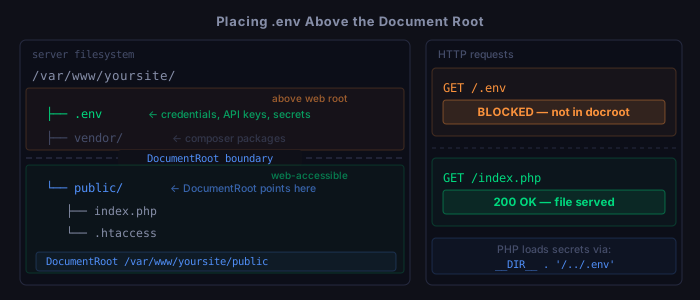
DocumentRoot. Placing .env above that directory makes it physically unreachable — no rule required.Filesystem layout:
/var/www/yoursite/
.env ← above DocumentRoot, unreachable via HTTP
vendor/ ← above DocumentRoot
public/ ← DocumentRoot points here
index.php
.htaccessDocumentRoot /var/www/yoursite/publicPHP loads the file using a relative path from the docroot, going one level up:
$dotenv = Dotenv\Dotenv::createImmutable(__DIR__ . '/../');
$dotenv->load();
Option A — block in Apache VirtualHost
If you cannot restructure the directory layout, add a <FilesMatch>
directive inside your <VirtualHost> block:
<VirtualHost *:443>
    DocumentRoot /var/www/yoursite

    # Block all dot-files (covers .env, .git, .htpasswd, etc.)
    <FilesMatch "^\.">
        Require all denied
    </FilesMatch>

    # ... rest of VirtualHost config
</VirtualHost>
# Reload Apache after editing
sudo systemctl reload apache2
# Verify the block works
curl -I https://yourdomain.com/.env
# Expected response: 403 ForbiddenOption B — block in .htaccess
Use this only if you cannot edit the VirtualHost config directly. Add to your
root .htaccess:
# Deny access to all dot-files
<FilesMatch "^\.">
    Require all denied
</FilesMatch>.htaccessrules only fire ifAllowOverrideis enabled for your document root. If you control the server, prefer Option A — it requires no per-request filesystem lookup and cannot be accidentally overwritten or deleted with your project files.
Installation
With Composer
sudo apt install composer         # if not already installed
composer require vlucas/phpdotenv
This creates vendor/ and composer.json. Add
vendor/ to .gitignore, then load the autoloader at
the top of your bootstrap or entry-point file:
<?php
require_once __DIR__ . '/vendor/autoload.php';

$dotenv = Dotenv\Dotenv::createImmutable(__DIR__);
$dotenv->load();

// Optional: throw an exception on startup if required keys are missing
$dotenv->required(['DB_HOST', 'DB_NAME', 'DB_PASS']);
Without Composer — manual parser
For projects with no build step or package manager, this function replicates the
core behavior of createImmutable(): it loads the file, skips
comments and blank lines, strips outer quotes, and lets real environment variables
set by the OS or web server take precedence over the file.
<?php
function load_dotenv(string $path): void {
    if (!is_readable($path)) {
        return;
    }
    foreach (file($path, FILE_IGNORE_NEW_LINES | FILE_SKIP_EMPTY_LINES) as $line) {
        if (str_starts_with(trim($line), '#')) {
            continue;
        }
        [$key, $value] = explode('=', $line, 2);
        $key   = trim($key);
        $value = trim($value, " \t\n\r\0\x0B\"'");
        if ($key !== '' && !array_key_exists($key, $_ENV)) {
            $_ENV[$key]    = $value;
            $_SERVER[$key] = $value;
            putenv("$key=$value");
        }
    }
}

load_dotenv(__DIR__ . '/../.env');
Reading values in PHP
After the file is loaded, all three access methods work. Prefer
$_ENV in web code — it is the most explicit and easiest to
reason about:
// Most explicit — prefer this in web code
$key  = $_ENV['STRIPE_SECRET_KEY'];
$host = $_ENV['DB_HOST'];

// Also works; useful in CLI scripts
$key = getenv('STRIPE_SECRET_KEY');

// Populated by both loaders
$key = $_SERVER['STRIPE_SECRET_KEY'];
A typical database connection using values from .env:
$pdo = new PDO(
    'mysql:host=' . $_ENV['DB_HOST'] . ';dbname=' . $_ENV['DB_NAME'],
    $_ENV['DB_USER'],
    $_ENV['DB_PASS']
);
What belongs in .env vs what belongs in code
Put in .env (never commit these):
  DB_PASS              # database password
  STRIPE_SECRET_KEY    # payment processor credentials
  SMTP_PASSWORD        # mail server credentials
  ENCRYPTION_KEY       # any key used for signing or encrypting
  OAUTH_CLIENT_SECRET  # OAuth app secrets
  WEBHOOK_SECRET       # signing secrets for inbound webhooks

Fine to hardcode or commit:
  TIMEOUT_SECONDS=30   # non-sensitive config defaults
  LOG_LEVEL=warning    # log verbosity
  APP_URL              # public URLs and slugs
  FEATURE_FLAG_NAMES   # flag names (not the secret values)
Ubuntu server deployment
On a fresh server, after cloning your repository:
# Copy the example file and populate it with production values
cp .env.example .env
nano .env

# Lock down permissions: readable by www-data, nobody else
chmod 640 .env
chown www-data:www-data .env

# Install Composer dependencies (server-only, never commit vendor/)
composer install --no-dev

# Confirm the file is blocked if it is inside the docroot
curl -I https://yourdomain.com/.env
# Expected: 403 Forbidden

# Confirm .env is NOT in git history
git log --all --full-history -- .env
Checklist
Before first commit:
  [ ] .env added to .gitignore
  [ ] .env.example committed with placeholder values for every key
  [ ] vendor/ added to .gitignore

Apache security (choose one):
  [ ] .env placed above DocumentRoot (Option C — recommended)
  [ ] OR FilesMatch "^\." block in VirtualHost config (Option A)
  [ ] curl -I https://yourdomain.com/.env returns 403

Installation:
  [ ] Composer installed: composer require vlucas/phpdotenv
  [ ] OR manual load_dotenv() function added to bootstrap
  [ ] Dotenv loaded before any code that reads $_ENV

Server deployment:
  [ ] .env copied from .env.example and filled with production values
  [ ] chmod 640 .env && chown www-data:www-data .env
  [ ] composer install --no-dev run on server (not locally)
  [ ] git log --all --full-history -- .env shows no results