Server Setup
Private Git Server
SSH-based git hosting with per-repository access control — no extra software, no monthly fee.
TL;DR
You can run a full private git hosting service on an Ubuntu server using only
tools that ship with git itself — no Gitea, no GitLab, no Gogs. The
approach is simple: one dedicated system user (git), SSH public-key
authentication, and a shell wrapper that checks a plain-text access file before
executing any git command. The result is a server that handles multiple users and
multiple repositories with read/write or read-only permission per combination.
Architecture
Every client connects via SSH as the git user. The git
user’s login shell is git-shell, which blocks interactive
logins and restricts the session to git operations only. Each public key in
authorized_keys has a command= option that runs the
authorization wrapper before executing any git command. The wrapper reads a
per-user access file and either executes the git command or returns an
“Access denied” error.
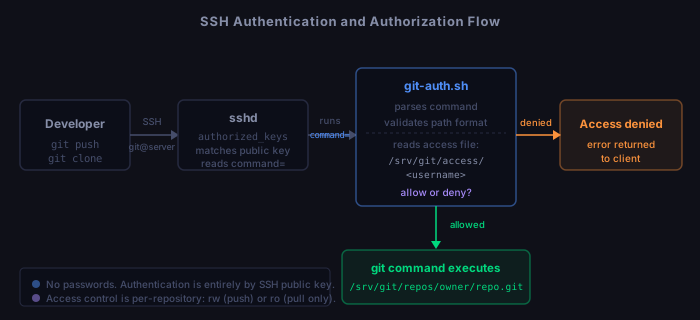
Clone URL format:  git@mikegit.com:owner/reponame.git

Directory layout:
  /srv/git/
    repos/            ← all bare repositories
      alice/
        project1.git/
      bob/
        webapp.git/
    access/           ← per-user access control files
      alice           ← lists repos alice can access
      bob

  /home/git/.ssh/
    authorized_keys   ← all user public keys with command= wrappers

  /opt/gitserver/
    bin/              ← admin scripts (git-auth.sh, gs-*.sh)
    hooks/            ← post-receive hook template
Prerequisites
# Verify before starting
apache2 -v
git --version
openssl s_client -connect yourdomain.com:443 -brief </dev/null
You need an Ubuntu 22.04 server with Apache + SSL already configured. The git server layers on top of an existing Apache vhost — it does not replace your existing site.
Phase 1 — Package installation
apt update
apt install -y git gitweb php libapache2-mod-php fail2ban

# Enable required Apache modules
a2enmod cgi php8.3
systemctl restart apache2

# Verify gitweb installed
ls /usr/share/gitweb/gitweb.cgi
Phase 2 — System user and directories
# Create the git system user; git-shell is the login shell
useradd \
  --system \
  --shell /usr/bin/git-shell \
  --home-dir /home/git \
  --create-home \
  --comment "Git server" \
  git

# Confirm the path (may differ on your system)
which git-shell

# Create directory structure
mkdir -p /srv/git/repos /srv/git/access /srv/git/pending-keys /srv/git/archive
mkdir -p /opt/gitserver/bin /opt/gitserver/hooks
mkdir -p /var/www/gitserver/public /var/www/gitserver/addkey
mkdir -p /var/log/gitserver

# SSH directory for the git user
mkdir -p /home/git/.ssh
touch /home/git/.ssh/authorized_keys

# Set ownership and permissions
chown -R git:git /srv/git
chown -R git:git /home/git
chmod 755 /srv/git /srv/git/repos
chmod 750 /srv/git/access
chown git:www-data /srv/git/pending-keys
chmod 1770 /srv/git/pending-keys   # sticky bit prevents cross-deletion
chown git:git /var/log/gitserver
chmod 750 /var/log/gitserver
chmod 700 /home/git/.ssh
chmod 600 /home/git/.ssh/authorized_keys
chown -R www-data:www-data /var/www/gitserver
chown -R root:root /opt/gitserver

# Add www-data to the git group (gitweb needs to read repos)
usermod -aG git www-data

# Add admin scripts to root's PATH
echo 'export PATH="/opt/gitserver/bin:$PATH"' >> /root/.bashrc
source /root/.bashrc
Phase 3 — SSH configuration
Edit /etc/ssh/sshd_config to lock down the git user
to key-only access while leaving root SSH intact:
# Append to /etc/ssh/sshd_config
Match User git
    PasswordAuthentication no
    PubkeyAuthentication yes
    AllowTcpForwarding no
    X11Forwarding no
    PermitTTY no
ForceCommand /usr/bin/git-shellTheForceCommandhere is belt-and-suspenders alongside thecommand=inauthorized_keys. Thecommand=wrapper runs first and handles per-repo authorization.ForceCommandcatches any edge case where a key entry lackscommand=.
# Test before reloading (no output = config is valid)
sshd -t
systemctl reload sshd

# Verify root SSH still works from a second terminal before closing this session
Phase 4 — Authorization wrapper
This script is the core of per-repository access control. SSH runs it instead of
the git command the client requested. It reads SSH_ORIGINAL_COMMAND,
validates the repository path, checks the user’s access file, and either
executes the git command or exits with an error.
#!/bin/bash
USERNAME="$1"
ACCESS_FILE="/srv/git/access/${USERNAME}"
REPOS_BASE="/srv/git/repos"

if [ -z "$USERNAME" ]; then
    echo "ERROR: Auth wrapper called without username." >&2
    exit 1
fi

if [ -z "$SSH_ORIGINAL_COMMAND" ]; then
    echo "mikegit.com: Hello ${USERNAME}. Interactive shell access is not permitted."
    echo "Usage: git clone git@mikegit.com:<owner>/<repo>.git"
    exit 0
fi

GIT_CMD=$(echo "$SSH_ORIGINAL_COMMAND" | awk '{print $1}')
REPO_PATH=$(echo "$SSH_ORIGINAL_COMMAND" | sed "s/^[^ ]* '//;s/'$//;s/^[^ ]* //")

case "$GIT_CMD" in
    git-upload-pack|git-receive-pack|git-upload-archive) ;;
    *)
        echo "ERROR: Unsupported command: ${GIT_CMD}" >&2
        exit 1
        ;;
esac

REPO_PATH="${REPO_PATH#/}"
REPO_PATH="${REPO_PATH#srv/git/repos/}"

if [[ ! "$REPO_PATH" =~ ^[a-zA-Z0-9_-]+/[a-zA-Z0-9_.+-]+\.git$ ]]; then
    echo "ERROR: Invalid repository path: ${REPO_PATH}" >&2
    exit 1
fi

REPO_KEY="${REPO_PATH%.git}"
FULL_PATH="${REPOS_BASE}/${REPO_PATH}"

if [ ! -d "$FULL_PATH" ]; then
    echo "ERROR: Repository not found: ${REPO_PATH}" >&2
    exit 1
fi

if [ "$GIT_CMD" = "git-receive-pack" ]; then
    REQUIRED="rw"
else
    REQUIRED="ro"
fi

if [ ! -f "$ACCESS_FILE" ]; then
    echo "ERROR: Access denied (no access file for ${USERNAME})." >&2
    exit 1
fi

GRANTED=""
while IFS=" " read -r entry_repo entry_perm rest; do
    [[ "$entry_repo" =~ ^#.*$ ]] && continue
    [[ -z "$entry_repo" ]] && continue
    if [ "$entry_repo" = "$REPO_KEY" ]; then
        if [ "$REQUIRED" = "ro" ] && [[ "$entry_perm" =~ ^(ro|rw)$ ]]; then
            GRANTED="yes"
        elif [ "$REQUIRED" = "rw" ] && [ "$entry_perm" = "rw" ]; then
            GRANTED="yes"
        fi
        break
    fi
done < "$ACCESS_FILE"

if [ "$GRANTED" != "yes" ]; then
    echo "ERROR: Access denied to ${REPO_KEY} for user ${USERNAME}." >&2
    exit 1
fi

exec "$GIT_CMD" "$FULL_PATH"
chmod 755 /opt/gitserver/bin/git-auth.sh
chown root:root /opt/gitserver/bin/git-auth.sh
When an admin adds a user, their key is stored in
authorized_keys with this format:
# /home/git/.ssh/authorized_keys — one line per user:
command="/opt/gitserver/bin/git-auth.sh alice",no-pty,no-port-forwarding,no-X11-forwarding,no-agent-forwarding ssh-ed25519 AAAA...keydata... gs-user=alice
The command= means SSH runs git-auth.sh alice instead
of what the client requested. The client’s original command arrives in
$SSH_ORIGINAL_COMMAND. The restriction flags prevent interactive
sessions, port forwarding, and agent forwarding.
Phase 5 — Admin scripts
All scripts live in /opt/gitserver/bin/, are owned by root, and
must be run as root. Scripts are named gs-* (git server).
#!/bin/bash
set -euo pipefail
[ "$EUID" -ne 0 ] && { echo "Must run as root."; exit 1; }
[ $# -ne 2 ] && { echo "Usage: gs-adduser.sh <username> <pubkey-file>"; exit 1; }

USERNAME="$1"
PUBKEY_FILE="$2"
AUTH_WRAPPER="/opt/gitserver/bin/git-auth.sh"
AUTH_KEYS="/home/git/.ssh/authorized_keys"
ACCESS_FILE="/srv/git/access/${USERNAME}"

[[ "$USERNAME" =~ ^[a-zA-Z0-9_-]{2,32}$ ]] || {
    echo "Invalid username. 2-32 characters: letters, numbers, underscore, hyphen."; exit 1; }
[ -f "$PUBKEY_FILE" ] || { echo "Key file not found: $PUBKEY_FILE"; exit 1; }

PUBKEY=$(tr -d '\n\r' < "$PUBKEY_FILE")
[[ "$PUBKEY" =~ ^(ssh-rsa|ssh-ed25519|ecdsa-sha2-nistp256|ecdsa-sha2-nistp384|ecdsa-sha2-nistp521|sk-ssh-ed25519|sk-ecdsa-sha2-nistp256)[[:space:]]+[A-Za-z0-9+/]+=* ]] || {
    echo "Invalid public key format."; exit 1; }

grep -q "gs-user=${USERNAME}$" "$AUTH_KEYS" 2>/dev/null && {
    echo "User '${USERNAME}' already exists."; exit 1; }

mkdir -p "/srv/git/repos/${USERNAME}"
chown git:git "/srv/git/repos/${USERNAME}"
chmod 750 "/srv/git/repos/${USERNAME}"

touch "$ACCESS_FILE"
chown git:git "$ACCESS_FILE"
chmod 640 "$ACCESS_FILE"

KEYLINE="command=\"${AUTH_WRAPPER} ${USERNAME}\",no-pty,no-port-forwarding,no-X11-forwarding,no-agent-forwarding ${PUBKEY} gs-user=${USERNAME}"
echo "$KEYLINE" >> "$AUTH_KEYS"

echo "User '${USERNAME}' added."
echo "Next: gs-createrepo.sh ${USERNAME} <reponame>"#!/bin/bash
set -euo pipefail
[ "$EUID" -ne 0 ] && { echo "Must run as root."; exit 1; }
[ $# -lt 2 ] && { echo "Usage: gs-createrepo.sh <username> <reponame> [--description \"text\"]"; exit 1; }
USERNAME="$1"
REPONAME="$2"
DESCRIPTION=""
[ "${3:-}" = "--description" ] && DESCRIPTION="${4:-}"
[[ "$USERNAME" =~ ^[a-zA-Z0-9_-]{2,32}$ ]] || { echo "Invalid username."; exit 1; }
[[ "$REPONAME" =~ ^[a-zA-Z0-9_.-]{1,64}$ ]] || {
echo "Invalid repo name. Letters, numbers, underscore, hyphen, dot."; exit 1; }
REPO_DIR="/srv/git/repos/${USERNAME}/${REPONAME}.git"
HOOK_TEMPLATE="/opt/gitserver/hooks/post-receive"
ACCESS_FILE="/srv/git/access/${USERNAME}"
[ -d "/srv/git/repos/${USERNAME}" ] || {
echo "User directory not found. Run gs-adduser.sh first."; exit 1; }
[ -d "$REPO_DIR" ] && {
echo "Repository '${USERNAME}/${REPONAME}' already exists."; exit 1; }
git init --bare "$REPO_DIR"
chown -R git:git "$REPO_DIR"
chmod -R u=rwX,g=rX,o= "$REPO_DIR"
[ -n "$DESCRIPTION" ] && echo "$DESCRIPTION" > "${REPO_DIR}/description"
echo "$USERNAME" > "${REPO_DIR}/owner"
if [ -f "$HOOK_TEMPLATE" ]; then
cp "$HOOK_TEMPLATE" "${REPO_DIR}/hooks/post-receive"
chown git:git "${REPO_DIR}/hooks/post-receive"
chmod 755 "${REPO_DIR}/hooks/post-receive"
fi
touch "$ACCESS_FILE"
grep -q "^${USERNAME}/${REPONAME} " "$ACCESS_FILE" 2>/dev/null || \
echo "${USERNAME}/${REPONAME} rw" >> "$ACCESS_FILE"
echo "Repository created: ${USERNAME}/${REPONAME}.git"
echo " Clone URL: git@mikegit.com:${USERNAME}/${REPONAME}.git"
echo " Owner '${USERNAME}' granted rw access automatically."#!/bin/bash
set -euo pipefail
[ "$EUID" -ne 0 ] && { echo "Must run as root."; exit 1; }
[ $# -lt 2 ] && { echo "Usage: gs-grantaccess.sh <username> <owner/reponame> [rw|ro]"; exit 1; }
USERNAME="$1"
REPO_SPEC="${2%.git}"
PERMISSION="${3:-rw}"
[[ "$PERMISSION" =~ ^(rw|ro)$ ]] || { echo "Permission must be rw or ro."; exit 1; }
grep -q "gs-user=${USERNAME}$" /home/git/.ssh/authorized_keys 2>/dev/null || {
echo "User '${USERNAME}' not found."; exit 1; }
[ -d "/srv/git/repos/${REPO_SPEC}.git" ] || {
echo "Repository '${REPO_SPEC}' not found."; exit 1; }
ACCESS_FILE="/srv/git/access/${USERNAME}"
touch "$ACCESS_FILE"
chown git:git "$ACCESS_FILE"
chmod 640 "$ACCESS_FILE"
sed -i "/^${REPO_SPEC} /d" "$ACCESS_FILE"
echo "${REPO_SPEC} ${PERMISSION}" >> "$ACCESS_FILE"
echo "Granted ${USERNAME} [${PERMISSION}] access to ${REPO_SPEC}"#!/bin/bash
set -euo pipefail
[ "$EUID" -ne 0 ] && { echo "Must run as root."; exit 1; }
[ $# -ne 2 ] && { echo "Usage: gs-revokeaccess.sh <username> <owner/reponame>"; exit 1; }
USERNAME="$1"
REPO_SPEC="${2%.git}"
ACCESS_FILE="/srv/git/access/${USERNAME}"
[ -f "$ACCESS_FILE" ] || { echo "No access file for '${USERNAME}'."; exit 1; }
if grep -q "^${REPO_SPEC} " "$ACCESS_FILE"; then
sed -i "/^${REPO_SPEC} /d" "$ACCESS_FILE"
echo "Revoked ${USERNAME}'s access to ${REPO_SPEC}"
else
echo "No access entry found for ${USERNAME} on ${REPO_SPEC}"
fi#!/bin/bash
if [ "$1" = "--repo" ] && [ -n "${2:-}" ]; then
REPO_SPEC="${2%.git}"
echo "Users with access to ${REPO_SPEC}:"
for f in /srv/git/access/*; do
[ -f "$f" ] || continue
user=$(basename "$f")
if grep -q "^${REPO_SPEC} " "$f" 2>/dev/null; then
perm=$(grep "^${REPO_SPEC} " "$f" | awk '{print $2}')
echo " ${user} [${perm}]"
fi
done
elif [ -n "${1:-}" ]; then
ACCESS_FILE="/srv/git/access/$1"
[ -f "$ACCESS_FILE" ] && [ -s "$ACCESS_FILE" ] || {
echo "No access entries for '$1'."; exit 0; }
echo "Access for $1:"
grep -v '^#' "$ACCESS_FILE" | grep -v '^$' | while IFS=" " read -r repo perm; do
echo " ${repo} [${perm}]"
done
else
echo "Usage: gs-showaccess.sh <username>"
echo " gs-showaccess.sh --repo <owner/reponame>"
fi#!/bin/bash
set -euo pipefail
[ "$EUID" -ne 0 ] && { echo "Must run as root."; exit 1; }
[ $# -lt 1 ] && { echo "Usage: gs-removeuser.sh <username> [--archive]"; exit 1; }
USERNAME="$1"
ARCHIVE=false
[ "${2:-}" = "--archive" ] && ARCHIVE=true
AUTH_KEYS="/home/git/.ssh/authorized_keys"
REPOS_DIR="/srv/git/repos/${USERNAME}"
ACCESS_FILE="/srv/git/access/${USERNAME}"
grep -q "gs-user=${USERNAME}$" "$AUTH_KEYS" 2>/dev/null || {
echo "User '${USERNAME}' not found."; exit 1; }
sed -i "/gs-user=${USERNAME}$/d" "$AUTH_KEYS"
[ -f "$ACCESS_FILE" ] && rm "$ACCESS_FILE"
for f in /srv/git/access/*; do
[ -f "$f" ] && sed -i "/^${USERNAME}\//d" "$f"
done
if [ -d "$REPOS_DIR" ]; then
if $ARCHIVE; then
DEST="/srv/git/archive/${USERNAME}_$(date +%Y%m%d_%H%M%S)"
mv "$REPOS_DIR" "$DEST"
echo "Repos archived to: $DEST"
else
echo "WARNING: Permanently delete all repos for '${USERNAME}'?"
read -rp "Type DELETE to confirm: " CONFIRM
[ "$CONFIRM" = "DELETE" ] && rm -rf "$REPOS_DIR" && echo "Repos deleted." || echo "Cancelled."
fi
fi
echo "User '${USERNAME}' removed."#!/bin/bash
set -euo pipefail
[ "$EUID" -ne 0 ] && { echo "Must run as root."; exit 1; }
[ $# -ne 2 ] && { echo "Usage: gs-updatekey.sh <username> <new-pubkey-file>"; exit 1; }
USERNAME="$1"
PUBKEY_FILE="$2"
AUTH_WRAPPER="/opt/gitserver/bin/git-auth.sh"
AUTH_KEYS="/home/git/.ssh/authorized_keys"
grep -q "gs-user=${USERNAME}$" "$AUTH_KEYS" 2>/dev/null || {
echo "User '${USERNAME}' not found."; exit 1; }
[ -f "$PUBKEY_FILE" ] || { echo "Key file not found: $PUBKEY_FILE"; exit 1; }
PUBKEY=$(tr -d '\n\r' < "$PUBKEY_FILE")
[[ "$PUBKEY" =~ ^(ssh-rsa|ssh-ed25519|ecdsa-sha2-nistp256|ecdsa-sha2-nistp384|ecdsa-sha2-nistp521|sk-ssh-ed25519|sk-ecdsa-sha2-nistp256)[[:space:]]+[A-Za-z0-9+/]+=* ]] || {
echo "Invalid public key format."; exit 1; }
sed -i "/gs-user=${USERNAME}$/d" "$AUTH_KEYS"
KEYLINE="command=\"${AUTH_WRAPPER} ${USERNAME}\",no-pty,no-port-forwarding,no-X11-forwarding,no-agent-forwarding ${PUBKEY} gs-user=${USERNAME}"
echo "$KEYLINE" >> "$AUTH_KEYS"
echo "Key updated for '${USERNAME}'."#!/bin/bash
AUTH_KEYS="/home/git/.ssh/authorized_keys"
[ -f "$AUTH_KEYS" ] || { echo "No users registered."; exit 0; }
echo "Registered users:"
grep -oP "gs-user=\K[^\s]+" "$AUTH_KEYS" 2>/dev/null | sort | while read -r user; do
count=0
[ -d "/srv/git/repos/${user}" ] && \
count=$(find "/srv/git/repos/${user}" -maxdepth 1 -name "*.git" -type d 2>/dev/null | wc -l)
printf " %-20s %d repo(s)\n" "$user" "$count"
done# Set permissions on all scripts
chmod 755 /opt/gitserver/bin/*.sh
chown root:root /opt/gitserver/bin/*.shPhase 6 — Post-receive hook
This hook runs on the server after every successful push. It logs push activity
to a central log file. The hook is installed as a template; new repositories get
it automatically via gs-createrepo.sh.
#!/bin/bash
REPO_DIR=$(pwd)
REPO_NAME=$(basename "$REPO_DIR" .git)
REPO_OWNER=$(basename "$(dirname "$REPO_DIR")")
LOG_FILE="/var/log/gitserver/push.log"
TIMESTAMP=$(date '+%Y-%m-%d %H:%M:%S')

while read -r OLDREV NEWREV REFNAME; do
    BRANCH="${REFNAME#refs/heads/}"
    if [ "$OLDREV" = "0000000000000000000000000000000000000000" ]; then
        ACTION="new-branch"
    elif [ "$NEWREV" = "0000000000000000000000000000000000000000" ]; then
        ACTION="delete-branch"
    else
        ACTION="push"
    fi
    echo "[${TIMESTAMP}] ${ACTION} repo=${REPO_OWNER}/${REPO_NAME} branch=${BRANCH} old=${OLDREV:0:8} new=${NEWREV:0:8}" >> "$LOG_FILE"
done
chmod 755 /opt/gitserver/hooks/post-receive
chown root:root /opt/gitserver/hooks/post-receive
# Install into all existing repos (and automatically into all future repos)
gs-install-hooks.shPhase 7 — Apache virtual host additions
Add the following inside your existing SSL <VirtualHost *:443>
block, before the closing </VirtualHost> tag:
<VirtualHost *:443>
    # ... your existing config ...

    # SSH key upload form (self-service for new users)
    Alias /addkey /var/www/gitserver/addkey
    <Directory /var/www/gitserver/addkey>
        Options -Indexes -ExecCGI
        AllowOverride None
        Require all granted
    </Directory>

    # Gitweb repository browser
    Alias /gitweb /usr/share/gitweb
    <Directory /usr/share/gitweb>
        Options +ExecCGI -Indexes
        AddHandler cgi-script .cgi
        DirectoryIndex gitweb.cgi
        AllowOverride None
        Require all granted
    </Directory>
</VirtualHost>
apache2ctl configtest
systemctl reload apache2Phase 8 — Gitweb configuration
$projectroot = "/srv/git/repos";
$site_name = "mikegit.com";
our @git_base_url_list = ("git\@mikegit.com");
$feature{highlight}{default} = [1];
$feature{blame}{default} = [1];
$feature{pickaxe}{default} = [1];
$feature{search}{default} = [1];a2enconf gitweb
apache2ctl configtest
systemctl reload apache2
# Optional: enable syntax highlighting in gitweb
apt install highlightGitweb runs aswww-data. Theusermod -aG git www-datastep in Phase 2 gives it read access to the repos. If gitweb cannot read a repo, verify:id www-datashowsgitin the groups, andls -la /srv/git/repos/showsgitas group owner withg=rXpermissions.
Phase 9 — fail2ban
# fail2ban was installed in Phase 1. Create a custom jail config:
cat > /etc/fail2ban/jail.d/gitserver.conf << 'EOF'
[sshd]
enabled  = true
port     = ssh
maxretry = 5
bantime  = 3600
findtime = 600

[sshd-aggressive]
enabled  = true
port     = ssh
filter   = sshd
maxretry = 3
bantime  = 86400
findtime = 3600
EOF

systemctl enable fail2ban
systemctl restart fail2ban
fail2ban-client status sshd

# Useful day-to-day commands:
fail2ban-client status sshd           # show banned IPs
fail2ban-client set sshd unbanip <IP> # unban a specific IP
User onboarding
Once your server is set up, new users need to submit an SSH public key to get access. Share these steps with anyone who needs access to a repository.
Step 1 — Generate an SSH key (skip if you already have one):
  ssh-keygen -t ed25519 -C "yourname@yourdomain.com"
  # Accept default path: ~/.ssh/id_ed25519
  # Set a passphrase when prompted

Step 2 — Display your public key:
  cat ~/.ssh/id_ed25519.pub
  # Output: ssh-ed25519 AAAAC3Nza... yourname@yourdomain.com
  # Send this entire line to the server admin

Step 3 — Optional: add ~/.ssh/config entry:
  Host mikegit
      HostName mikegit.com
      User git
      IdentityFile ~/.ssh/id_ed25519
      IdentitiesOnly yes

Step 4 — Test your connection after key is approved:
  ssh -T git@mikegit.com
  # Expected: mikegit.com: Hello alice. Interactive shell access is not permitted.

Step 5 — Use git normally:
  git clone git@mikegit.com:alice/project.git
  git push / git pull  # no password ever required
Per-repository access control
Each user’s access file at /srv/git/access/<username>
lists one repository per line with a permission level:
# /srv/git/access/alice
alice/project1 rw   ← alice can push and pull her own repo
bob/sharedlib  ro   ← alice can only pull from bob's repo
carol/infra    rw   ← alice has full access to carol's infra repo
A user with no access file, or whose file has no matching entry, gets “Access denied” before any git command runs. The repo’s existence is not revealed.
# Grant alice rw access to bob's webapp repo
gs-grantaccess.sh alice bob/webapp rw

# Grant carol read-only access to alice's project1
gs-grantaccess.sh carol alice/project1 ro

# Revoke bob's access to alice/project1
gs-revokeaccess.sh bob alice/project1

# Show all repos a user can access
gs-showaccess.sh alice

# Show all users who can access a repo
gs-showaccess.sh --repo alice/project1
Quick reference
User management:
  gs-adduser.sh    <username> <pubkey-file>
  gs-removeuser.sh <username> [--archive]
  gs-updatekey.sh  <username> <new-pubkey-file>
  gs-listusers.sh

Repository management:
  gs-createrepo.sh <username> <reponame> [--description "text"]
  gs-deleterepo.sh <username> <reponame> [--archive]
  gs-listrepos.sh  [username]

Access control:
  gs-grantaccess.sh  <username> <owner/reponame> [rw|ro]
  gs-revokeaccess.sh <username> <owner/reponame>
  gs-showaccess.sh   <username>
  gs-showaccess.sh   --repo <owner/reponame>

Pending key approvals (from web form):
  gs-approve-pending.sh

Service management:
  systemctl reload apache2          # after Apache config changes
  systemctl reload sshd             # after sshd_config changes
  tail -f /var/log/gitserver/push.log   # live push log
  tail -f /var/log/auth.log         # live SSH auth log

Key file locations:
  /home/git/.ssh/authorized_keys    # all user public keys
  /srv/git/repos/<user>/<repo>.git  # bare repositories
  /srv/git/access/<username>        # per-user repo access list
  /opt/gitserver/bin/               # admin scripts
  /etc/gitweb.conf                  # gitweb configuration
Checklist
Setup (Phases 1-4):
  [ ] Packages installed: git gitweb php libapache2-mod-php fail2ban
  [ ] git system user created with git-shell as login shell
  [ ] Directory structure created with correct permissions
  [ ] www-data added to git group: usermod -aG git www-data
  [ ] sshd_config updated with Match User git block
  [ ] sshd -t shows no errors; sshd reloaded
  [ ] Root SSH still works (tested from second terminal)
  [ ] git-auth.sh created and chmod 755

Admin scripts (Phase 5):
  [ ] All gs-*.sh scripts created in /opt/gitserver/bin/
  [ ] chmod 755 and chown root:root applied to all scripts
  [ ] /opt/gitserver/bin on root's PATH

Hooks and web (Phases 6-8):
  [ ] post-receive hook created and gs-install-hooks.sh run
  [ ] Apache vhost updated with gitweb and addkey aliases
  [ ] /etc/gitweb.conf created
  [ ] apache2ctl configtest passes; Apache reloaded

Security:
  [ ] fail2ban running: fail2ban-client status sshd
  [ ] ssh -T git@yourdomain.com returns welcome message, not a shell
  [ ] No repos are world-readable: find /srv/git/repos -perm /o=r returns nothing
  [ ] /home/git/.ssh permissions: 700 for dir, 600 for authorized_keys

Functional test:
  [ ] gs-adduser.sh testuser /tmp/testuser.pub succeeds
  [ ] gs-createrepo.sh testuser testrepo succeeds
  [ ] git clone git@yourdomain.com:testuser/testrepo.git succeeds
  [ ] git push works; push.log shows the event
  [ ] gs-removeuser.sh testuser cleans up